1 Quickstart
Hewbot is a browser game where you write Hew programs that drive a little bot through grid puzzles. Write a program, run it, and watch the bot follow your commands.
- Open play.hew.sh and pick L01 First Steps in the left panel.
- Read the level name, subtitle, and concept pill at the top.
- Most starters are incomplete. FPGA levels supply the Hew policy but leave the circuit for you to build. L08a supplies a working route to improve toward par.
- Click ▶ Run. Watch the bot animate. The overlay tells you what happened.
- Iterate. Use ↻ Replay to re-watch the same run without recompiling.
Where your program runs
Tape and actor programs try the browser compiler first. If a program needs features the browser sandbox cannot run, the game sends its source to the hosted compile service and simulates the returned commands in your browser. Per-tick programs and multi-file projects run only in the browser sandbox.
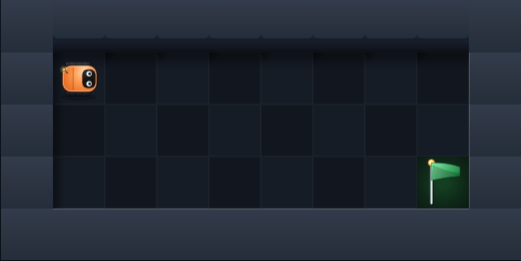
L01 First Steps — the board before your first run. Bot starts top-left; flag is bottom-right.
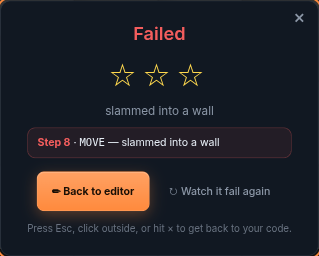
The run overlay appears after every run — pass or fail. Failure is normal early on; that's the iterate loop.
2 The Playfield
The board is a rectangular grid. Each cell is one tile. Your bot occupies one cell per tick
and can face North, East, South, or West. LEFT and RIGHT rotate
in-place; MOVE walks one cell forward.
A tiny level looks like this in text (the actual board is rendered with pixel art tiles):
##########
#S.......#
#........#
#.......G#
##########
Board symbols legend:
# | Wall — blocks all movement |
. | Floor — walk freely |
S | Start — you spawn here, facing the level's default direction |
G | Goal — step on it to win the level |
* | Gem — collect with PICKUP |
K | Key — collect with PICKUP; needed to open doors |
D | Door — open with USE while facing it |
B | Box — push by walking into it with MOVE |
P | Pressure plate — toggles a gate while weighted down |
H | Hazard — stepping here ends the run immediately (fail) |
3 Tape Mode
Most early levels use tape mode. Your program prints the full command list to stdout before the bot moves. Hewbot then replays that tape in your browser, one command per tick. Plan the route before the run.
Available commands (one per line, all uppercase):
MOVE
LEFT
RIGHT
PICKUP
USE
WAIT
Extend L01's one-step starter with bounded loops to reach the goal:
fn main() {
    // Walk east to the corner, then turn south and walk down.
    // Seven MOVEs east, one RIGHT, then two MOVEs south.
    for i in 0..7 { println("MOVE"); }
    println("RIGHT");
    for i in 0..2 { println("MOVE"); }
}
L02 and beyond teach loops, helper functions, gem collection, keys, and doors. The pattern is always the same: figure out the sequence, express it as Hew code, print it on stdout.
fn move_steps(n: i64) { ... } and call it.
4 Reactive Programs (Sensors)
From L06a onward, levels react to sensors. The INTERACTIVE badge covers two execution contracts: most levels ask you to implement a function inside a hidden typed world; FPGA levels ask for an explicit stdin loop in the browser sandbox. The hint above the editor names the contract for the current level.
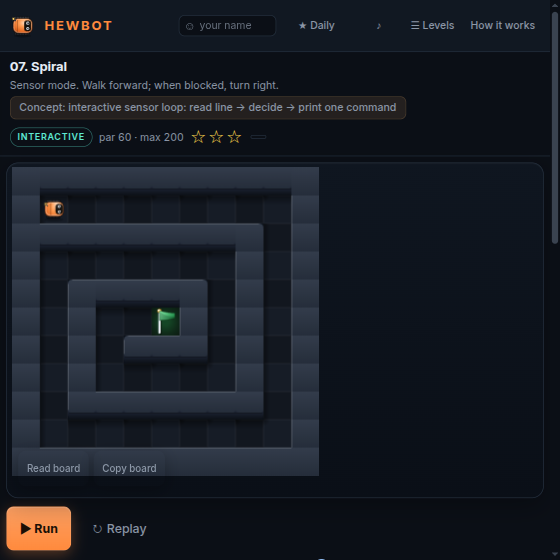
L07 Spiral — the first extended sensor route after L06a Handshake. Notice the INTERACTIVE badge and the spiral maze layout.
Sensor line format
The simulated world exposes space-separated key=value fields. A typical sensor line:
tick=4 x=3 y=1 facing=E ahead=floor left=wall right=wall here=floor keys=0 gems=0/0
Common fields:
tick=N | Tick counter, starts at 1 |
x= y= | Your grid coordinates |
facing=N|E|S|W | Direction you're currently pointing |
ahead=… | What's directly in front: wall, floor, goal, gem, key, door, box, hazard, enemy |
left=… | Same, for the cell to your left |
right=… | Same, for the cell to your right |
here=… | What's on your current cell |
keys=N | Keys in inventory |
gems=K/T | Collected gems / total gems on level |
enemy_dist=N | Cells to the nearest hostile actor |
signals=R,G,… | State of every Signal actor this tick |
signals_next=… | What those signals will be next tick (great for timing) |
here_next=… | What your current cell will become next tick |
Actor contract: implement the requested function
Most sensor levels, beginning with L06a Handshake, provide the map and run loop. You edit only the function shown in the starter. The hidden world calls it for every simulated tick, then Hewbot replays the complete command tape:
fn decide(sensor: string) -> string {
    if sensor.contains("right=floor") { return "RIGHT"; }
    if sensor.contains("ahead=floor") { return "MOVE"; }
    return "LEFT";
}
Later actor levels pass typed Sensor, Action, and memory values.
Per-tick FPGA contract: read → decide → print
FPGA levels run in the browser sandbox. They read one sensor line and print exactly one command per loop iteration. Turning consumes a tick, so any following move belongs on a later iteration:
import std.io;

fn main() {
    for i in 0..60 {
        let sensor = io.read_line().expect("read sensor input") ?? "";
        if sensor == "" { return; }
        if says(sensor, "danger_ahead=1") { println("WAIT"); }
        else { println("MOVE"); }
    }
}
The FPGA starter includes says, built from len, range indexing and ==.
Composing predicates
Small named predicates keep raw-sensor decisions readable:
fn walkable(sensor: string, dir: string) -> bool {
    says(sensor, dir + "=floor")
        || says(sensor, dir + "=gem")
        || says(sensor, dir + "=key")
        || says(sensor, dir + "=goal")
}
Actor-contract code can use sensor.contains("field=value"); sandbox code can build the same predicate with says.
5 Hew idioms used here
Hewbot introduces one Hew language feature at a time, in the level where the puzzle actually wants it. Here are the idioms that show up across the curriculum and the levels that introduce them.
for i in 0..N — bounded loop L02
Hew loops use a named index, such as i:
const HALL_LEN: i64 = 22;

fn main() {
    for i in 0..HALL_LEN {
        println("MOVE");
    }
}
Tape levels build the whole command list up front. Per-tick FPGA programs use the same loop syntax for their tick budget; actor-contract levels put their loop in the hidden harness.
const — named constants L02
Give repeated values a name with const NAME: type = value;.
enum + match — pattern matching L05
By L05 you're juggling MOVE / PICKUP / USE in the same level. Group them into an enum and dispatch with match:
enum Action { Move; Pickup; Use; }

fn perform(a: Action) {
    match a {
        Action.Move   => { println("MOVE"); }
        Action.Pickup => { println("PICKUP"); }
        Action.Use    => { println("USE"); }
    }
}
By L06 you can plan an entire run as an array of Action values and loop through it.
;.
Explicit memory across ticks L15
Actor levels pass your previous memory value back into decide. Return the next value with the action:
fn decide(s: Sensor, mem: i64) -> Decision {
    if mem == 0 { return Decision { action: Action.Say, mem: 1 }; }
    return Decision { action: Action.Move, mem: mem };
}
FPGA mental model L12+
In FPGA mode, a circuit combines input signals into named outputs. This Hew policy reads danger_ahead: it waits when the bit is high and moves otherwise.
fn main() {
    for i in 0..60 {
        let sensor = io.read_line().expect("read sensor input") ?? "";
        if sensor == "" { return; }
        if says(sensor, "danger_ahead=1") {
            println("WAIT");
        } else {
            println("MOVE");
        }
    }
}
Building the circuit
You build circuits in the FPGA simulator. The FPGA circuit panel runs the round trip:
- Open FPGA editor opens the editor in a new tab with this mission's input and output pads already placed, plus a clock pad when needed. Keep the pad labels: they identify the mission's hardware interface.
- Wire up your logic there, then press Share and copy the link.
- Paste it back into the panel and press Attach. The panel checks the circuit against the level and lists anything that would stop it running — an unwired output, a pad the level does not have, a flip-flop with no clock. Fix it and paste again.
Once attached, the panel shows your component count, the input pads your circuit reads and its output wiring. The circuit stays attached across reloads. Clear detaches it.
Missions marked Hardware interface required need a valid circuit attached before Run. Other FPGA missions also support a plain Hew solution that reads the raw signal_* fields.
Die on a hazard and the panel turns into a debugger: it shows the failing tick's input bits, every component's value, and the output the circuit handed back — so you can see which gate said the wrong thing.
6 Actors
Later levels add actors — other entities on the board that move independently of you. The sensor line tells you about them so you can plan around them.
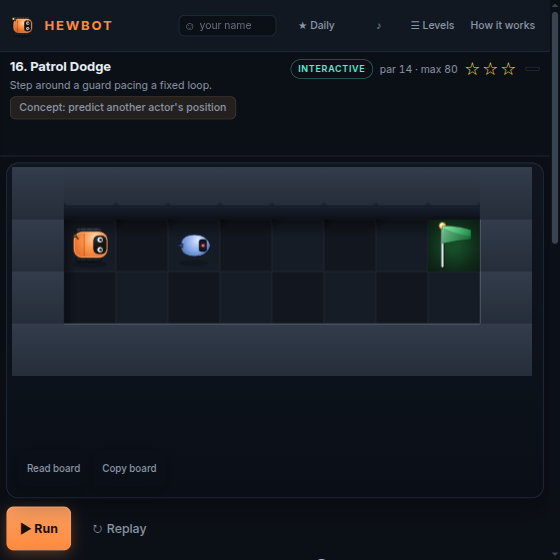
L16 Patrol Dodge — a guard paces a fixed route. Step where it isn't.
Actor types
| Patroller | Walks a fixed waypoint loop. Fully predictable — observe the cycle length and step into its path only when it's elsewhere. |
| Chaser | Moves toward you every N ticks. Uses enemy_dist to track. Plan side routes that the chaser can't intercept. |
| Signal | Flips state on a schedule. Use signals and signals_next to time your crossings. WAIT is your friend here. |
| Friend | Speaks a word you need to echo back. Use SAY <word> when adjacent. The sensor line includes friend_<id>=<word>. |
WAIT lets a tick pass without moving. Use it to time your crossings around signals and patrollers.
7 Stars & Scoring
Earn three stars for Solve, Par and Gems, plus an optional Elegance bonus. Solving each prerequisite is enough to unlock a mission. The other goals are for improving your solution.
Solve
Reach the goal within the level's max_steps budget. This is the only required star.
Par
Solve in ≤ the level's par step count.
Gems
Collect every gem on the level by visiting each * cell and using PICKUP. On levels without gems, this star comes with Par.
Elegance bonus
Earn all three stars and keep your source at or below the line-count target. This extra star rewards loops and helpers over repeated commands. Hints do not reduce your score.
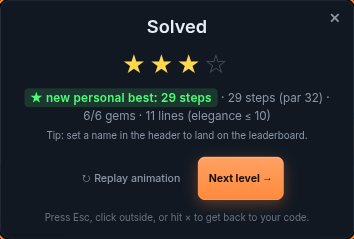
Solve, Par and Gems stars after a run, with a separate Elegance bonus star.
8 World Map
The left pane shows your progress through all levels. Toggle between map and flat views with the button at the top of the pane.
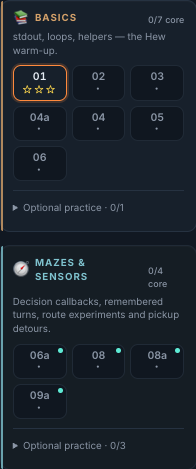
Follow a chapter's core missions. Expand optional practice when you want another puzzle on the same idea.
Tracks at a glance
| Basics | Tape mode. Loops, helpers, gems, keys, doors. The Hew warm-up (L01–L06). |
| Mazes & Sensors | Decision callbacks, wall-following, route comparison and pickup detours. |
| Boxes & Plates | Pushing boxes, pressure plates, toggle gates (L10–L11a). |
| Timing & Prediction | Predict a safe crossing in Door Cycle; transfer the policy to Two Lights as optional practice. |
| Hardware Lab | A separate circuit branch: decoding, clocked state, ROM, filtering, comparisons and arithmetic. |
| Actors & Messages | Friend NPCs, prediction, two-door reactions, then sequenced messages. |
| Route Planning | Gem-route planning, with extra navigation and efficiency practice. |
| Actor Interfaces | Exchange messages between local World and Explorer actors in one program; handle replies and remember explored paths. |
The map has 36 core missions and 15 optional practice missions. Progress and per-level code are saved in your browser. Reset progress clears stars. Your saved code stays available.
9 Keyboard shortcuts
Global shortcuts (when focus is outside the code editor):
R | Run the current code |
Space | Replay the last animation (no recompile) |
[ / ] | Previous / next unlocked level within the current chapter |
H | Toggle the Hint panel under the controls |
\ | Collapse / expand the right sidebar |
? | Open the in-game help dialog |
Esc | Close the win/lose overlay or help dialog |
In-editor shortcuts (Monaco):
Ctrl/⌘+Enter | Run the current code |
Ctrl/⌘+/ | Toggle line comment |
Ctrl/⌘+S | Browser save — editor content is auto-saved per level anyway |
§ placeholder.
10 Tips & Gotchas
Debugging your code
- The Compiler output panel maps errors back to editable
main.hewlines. Hidden harness failures are labeled separately. - The Bot tape (stdout) panel shows exactly what your program printed. Empty = your code never reached a
println. - The Transcript panel pairs sensor lines with replies on per-tick FPGA levels. Actor levels expose their generated command tape.
RIGHT uses one tick to turn 90° in place. Follow it with MOVE
on the next tick (or the next line of your tape) to advance.
Per-tick FPGA syntax quick-reference
import std.io;        // needed before io.read_line()

fn main() {
    var count = 0;       // mutable binding
    let limit = 10;      // immutable binding

    while count < limit {
        let line = io.read_line().expect("read sensor input") ?? "";   // None means EOF; use an empty line here
        if line == "" { break; }
        if says(line, "ahead=floor") { println("MOVE"); }
        else { println("LEFT"); }
        count = count + 1;
    }
}
says(line, "foo=bar") returns false when that field is absent.
Sensor field checks
// Actor contract (std.string is in the hidden package)
if sensor.contains("ahead=goal") { ... }

// Per-tick sandbox (says is supplied by the starter)
if says(sensor, "danger_ahead=1") { ... }
11 Where Next
A few useful links from here.
- Hew documentation — The language and standard-library reference for features you will meet after these lessons.
- play.hew.sh — Jump back into the game and start from L01.
- Hew community — Ask questions, discuss Hew and find where to report bugs.